Hi All,
This blog will help us to get the SQL statement of your X++ query.
generateonly - you need to extend your x++ select with generateonly command that will generate the query before it execute.
Expected result
X++ Code
Discover essential insights about D365 Finance and Operations (D365FO) through our user-friendly technical blog. Our content covers implementation, customization, troubleshooting, and key trends in D365FO. Stay informed about performance optimization, security updates, and X++ coding techniques. Learn efficient ways for data migration and workflow automation. Simplify your D365FO experience with our expert guidance. Your top resource for D365FO knowledge, designed for easy understanding.#Learn
Hi All,
This blog will help us to get the SQL statement of your X++ query.
generateonly - you need to extend your x++ select with generateonly command that will generate the query before it execute.
Expected result
Hi All,
Let's learn about multi-selection lookup in SSRS report and basics of SSRS reporting.
Requirement: Add voucher lookup from VendTrans on SSRS report dialog.
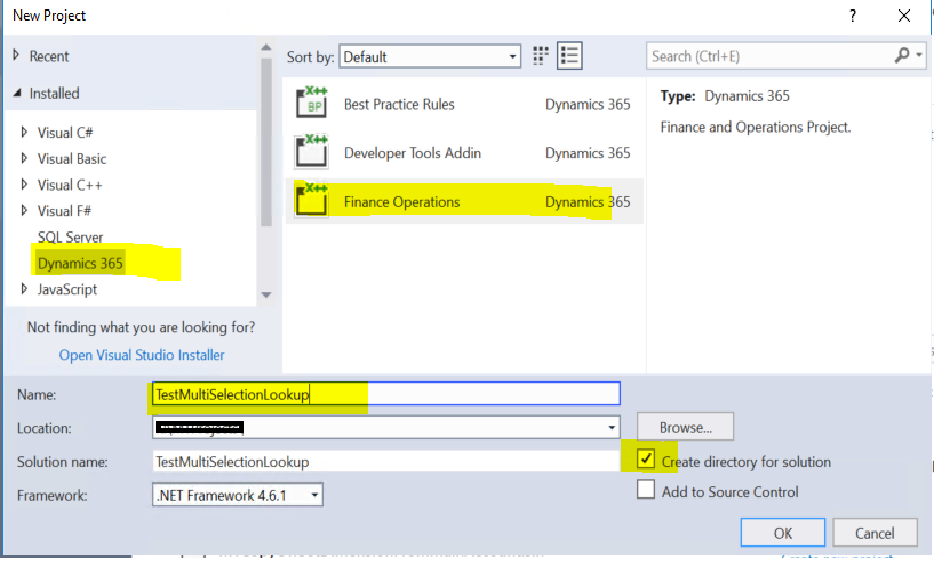
Select custom model and mark Synchronize DB on build true and click apply.
public final class TestMultiSelectionUIBuilder extends SysOperationAutomaticUIBuilder
{
DialogField dialogVoucherId;
public void VoucherIdLookup(FormStringControl _control)
{
Query query = new Query();
QueryBuildDataSource qbds;
container conVoucherID;
qbds = query.addDataSource(tableNum(VendTrans));
qbds.addSelectionField(fieldNum(VendTrans,Voucher));
SysLookupMultiSelectGrid::lookup(query, _control, _control, _control, conVoucherID);
}
public void postBuild()
{
TestMultiSelectionLookupContract contract;
super();
contract = this.dataContractObject() as TestMultiSelectionLookupContract;
dialogVoucherId = this.bindInfo().getDialogField(this.dataContractObject(), methodStr(TestMultiSelectionLookupContract, parmVoucherId));
dialogVoucherId.registerOverrideMethod(methodStr(FormStringControl, lookup), methodStr(TestMultiSelectionUIBuilder, VoucherIdLookup), this);
if (dialogVoucherId)
{
dialogVoucherId.lookupButton(2);
}
}
public void postRun()
{
//super();
}
}
[DataContractAttribute, SysOperationContractProcessingAttribute(classStr(TestMultiSelectionUIBuilder))]
public final class TestMultiSelectionLookupContract
{
List voucherlist;
[DataMemberAttribute("Exclude voucher"), AifCollectionTypeAttribute("Exclude voucher", Types::String), SysOperationLabelAttribute(literalStr("ExcludeVoucher")), SysOperationDisplayOrderAttribute('0')]
public List parmVoucherId(List _listVoucherId = voucherlist)
{
voucherlist = _listVoucherId;
return voucherlist;
}
}
[SRSReportParameterAttribute(classStr(TestMultiSelectionLookupContract))]
public final class TestMultiSelectionDP extends SRSReportDataProviderBase
{
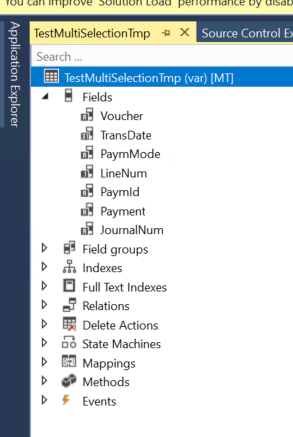
TestMultiSelectionTmp testMultiSelectionTmp;
List voucherlist;
str voucherStr;
[SRSReportDataSetAttribute(tableStr(TestMultiSelectionTmp))]
public TestMultiSelectionTmp getMTVendorCashForecastTmp()
{
select * from testMultiSelectionTmp;
return testMultiSelectionTmp;
}
[SysEntryPointAttribute]
public void processReport()
{
TestMultiSelectionLookupContract testMultiSelectionLookupContract = this.parmDataContract() as TestMultiSelectionLookupContract;
ListIterator voucherlistIterator;
voucherlist = testMultiSelectionLookupContract.parmVoucherId();
if(voucherlist != null)
{
voucherlistIterator = new ListIterator(voucherlist);
while (voucherlistIterator.more())
{
voucherStr += voucherlistIterator.value() + ',';
voucherlistIterator.next();
}
}
voucherStr = subStr(voucherStr, 1, strLen(voucherStr) - 1);
info(voucherStr);
// write your logic to insert data into temp table.
}
}
internal final class TestMultiSelectionLookupController extends SrsReportRunController
{
public void new()
{
super();
this.caption();
}
protected final str getReportName(TestMultiSelectionLookupContract _contract)
{
str reportNameLocal;
reportNameLocal = ssrsReportStr(TestMultiSelectionReport,Test1);
return reportNameLocal;
}
public ClassDescription caption()
{
return "Multi selection lookup";
}
public static void main(Args _args)
{
TestMultiSelectionLookupController controller;
controller = new TestMultiSelectionLookupController();
controller.parmArgs(_args);
controller.ParmReportName(ssrsReportStr(TestMultiSelectionReport,Test1));
controller.startOperation();
}
protected void preRunModifyContract()
{
TestMultiSelectionLookupContract contract = this.parmReportContract().parmRdpContract() as TestMultiSelectionLookupContract;
this.parmReportContract().parmReportName(this.getReportName(contract));
super();
}
}
Result:
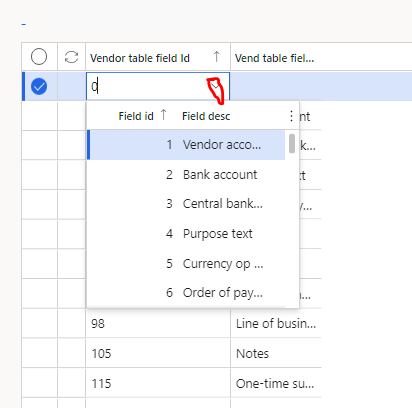
I am creating another blog here to know how to create table field Id Lookup.
Requirement - Show all VendTable field in lookup.
Solution/Steps
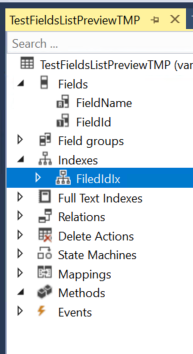
1) Create temprary table as shown in below screen with 2 fields.
Table name - TestFieldsListPreviewTMP
FieldName - use EDT fieldnameShort
FieldId - use EDT Integer
Set Property - TableType = InMemory
Create Primary index on FieldId
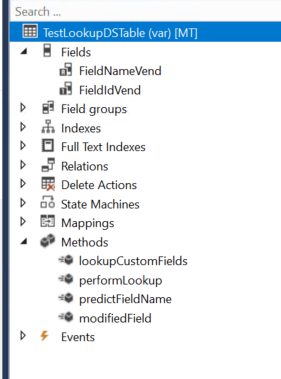
2) Create new table TestLookupDSTable for formDatasource where you want to show table field lookup.
Add methods in above table-
Create lookupFields() method to insert all the field list from table buffer.
public static TestFieldsListPreviewTMP lookupCustomFields(Common _common)
{
var dictTable = new DictTable(_common.TableId);
FieldId fieldId = dictTable.fieldNext(0);
TestFieldsListPreviewTMP fieldListPreview;
while (fieldId && ! isSysId(fieldId))
{
fieldListPreview.FieldId = fieldId;
fieldListPreview.FieldName = fieldId2PName(_common.tableId, fieldId);
fieldListPreview.insert();
fieldId = dictTable.fieldNext(fieldId);
}
return fieldListPreview;
}
public static void performLookup(Common _common, FormControl _formControl)
{
SysTableLookup sysTableLookup = SysTableLookup::newParameters(tablenum(TestFieldsListPreviewTMP), _formControl);
Query query = new Query();
QueryBuildDataSource queryBuildDataSource;
queryBuildDataSource = query.addDataSource(tablenum(TestFieldsListPreviewTMP));
queryBuildDataSource.addSortField(fieldNum(TestFieldsListPreviewTMP, FieldId), SortOrder::Ascending);
sysTableLookup.addLookupfield(fieldnum(TestFieldsListPreviewTMP, FieldId), true);
sysTableLookup.addLookupfield(fieldnum(TestFieldsListPreviewTMP, FieldName));
sysTableLookup.parmQuery(query);
TestFieldsListPreviewTMPfieldListTMP;
fieldListTMP = TestForDataSourceTable::lookupCustomFields(_common);
//TestVend2CustMapping is a form data source table.
sysTableLookup.parmTmpBuffer(fieldListTMP);
sysTableLookup.performFormLookup();
}
//Populate field name
public static FieldName predictFieldName(TableId _tableId, FieldId _fieldId)
{
return fieldId2PName(_tableId, _fieldId);
}
public void modifiedField(FieldId _fieldId)
{
super(_fieldId);
switch(_fieldId)
{
case (fieldNum(TestLookupDSTable,FieldIdVend )) :
this.FieldNameVend = TestLookupDSTable::predictFieldName(tableNum(VendTable), this.FieldIdVend);
break;
default:
}
}
3) Create new form and add TestLookupDSTable as data source and override datasource field lookup method and write below code.
public void lookup(FormControl _formControl, str _filterStr)
{
VendTable vendTable;
TestLookupDSTable::performLookup(vendTable, _formControl);
}
Result -
Hi All,
In this blog we will learn how to create ledger dimension using main account and default dimension RecId.
X++ Code
public static RecId getLedgerDimensionFromDefaultDimension(MainAccountNum _mainAccountId, RecId _defaultDimension)
{
MainAccount mainaccount = MainAccount::findByMainAccountId(_mainAccountId);
RecId ledgerddimension;
ledgerddimension = LedgerDimensionFacade::serviceCreateLedgerDimension(LedgerDefaultAccountHelper::getDefaultAccountFromMainAccountId(_mainAccountId), _defaultDimension);
return ledgerddimension;
}
Regards,
Vijay Yelmame
vijay.yelmame@2019@gmail.com
Hi All,
This blog will explain you how to get default dimension from ledger dimension by using standard methods. by using LedgerDimensionFacade class we can easily get it.
X++ Code
DimensionDefault defaultDimension = LedgerDimensionFacade::getDefaultDimensionFromLedgerDimension(ledgerJournalTrans.LedgerDimension);
Hi All,
In this blog we will learn how to get all selected records from form grid or form datasource in event handler.
X++ code.
[FormControlEventHandler(formControlStr(LedgerJournalTransCustPaym, UpdateOffsetDimension), FormControlEventType::Clicked)]
public static void UpdateOffsetDimension_OnClicked(FormControl sender, FormControlEventArgs e)
{
FormRun formRun = sender.formRun();
FormDataSource ledgerJournalTrans_ds;
LedgerJournalTrans ledgerJournalTrans;
ledgerJournalTrans_ds = formRun.dataSource(tableStr(LedgerJournalTrans));
MultiSelectionHelper selectionHelper = MultiSelectionHelper::construct();
selectionHelper.parmDataSource(ledgerJournalTrans_ds);
ledgerJournalTrans = selectionHelper.getFirst();
while (ledgerJournalTrans)
{
info(ledgerJournalTrans.Voucher);
ledgerJournalTrans = selectionHelper.getNext();
}
}
Hi all,
In this blog will learn how to modify the standard email subject and body generated through the Print Management.
Requirement -
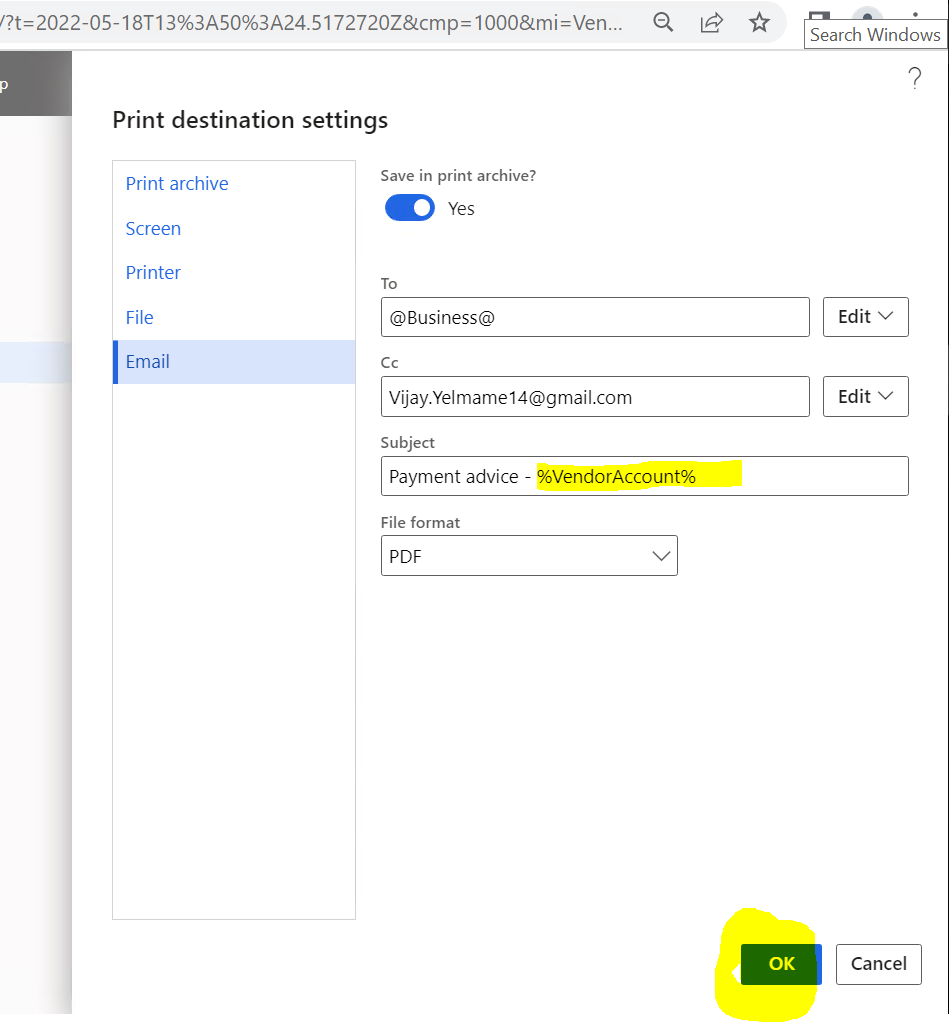
1) Add vendor code in Subject line.
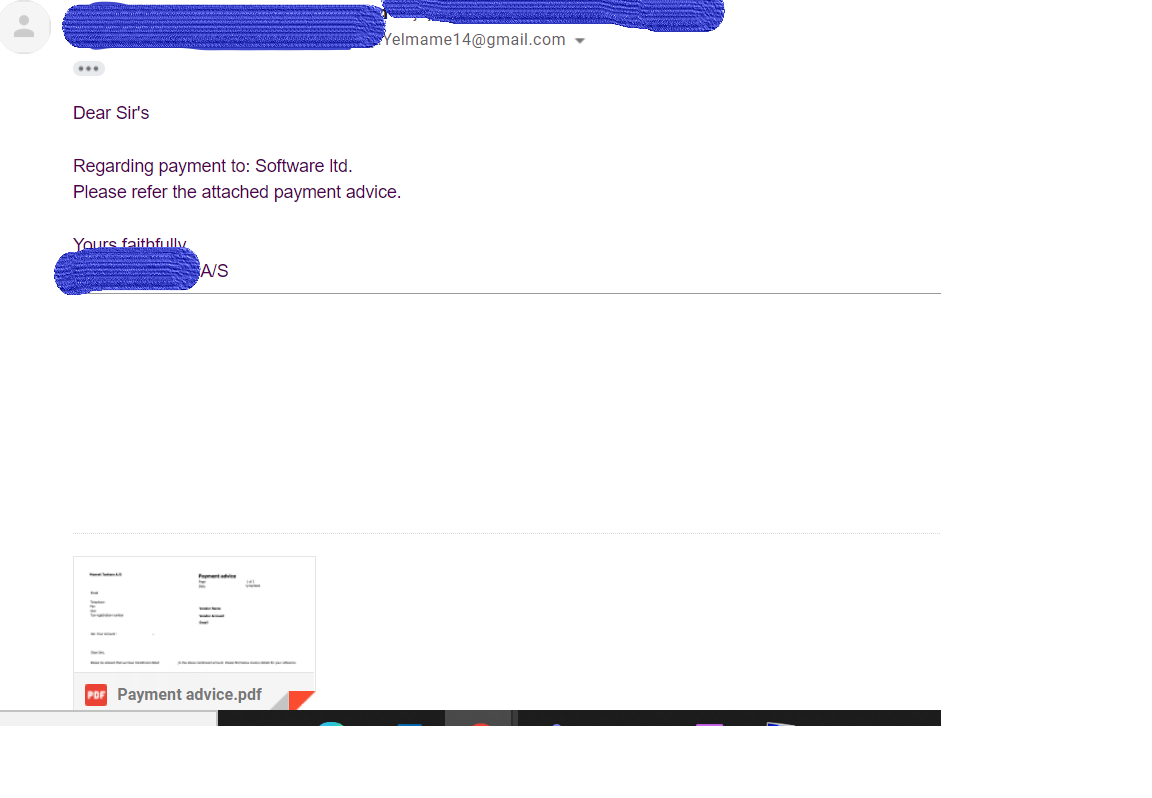
2) Modify email body - add vendor name and Legal entity name.
This can be achieve by doing small customization.
Solution/Steps
1) Create extension class for class - SRSPrintDestinationSettings and add below code.
[ExtensionOf(classstr(SRSPrintDestinationSettings))]
public final class TestSRSPrintDestinationSettings_Extension
{
internal str reportTitle;
internal RecId voucherRecId;
//Type of report
[DataMemberAttribute]
public str reportTitle(str _reportTitle = reportTitle)
{
reportTitle = _reportTitle;
return reportTitle;
}
[DataMemberAttribute]
public RecId voucherRecId(RecId _voucherRecId = voucherRecId)
{
voucherRecId = _voucherRecId;
return voucherRecId;
}
public SrsReportEMailDataContract parmEMailContract(SrsReportEMailDataContract _emailContract)
{
Notes emailBOdy;
SrsReportEmailDataContract contract;
LedgerJournalTrans ledgerJournalTrans;
contract = next parmEMailContract(_emailContract);
if (reportTitle == "Payment Advice")
{
emailSubject = contract.parmSubject();
select firstonly ledgerJournalTrans where ledgerJournalTrans.RecId == voucherRecId;
emailSubject = strReplace(emailSubject,"%VendorAccount%", ledgerJournalTrans.accountDisplay());
contract.parmSubject(emailSubject);
emailBOdy = VendParameters::find().MTEmailBodyForPaymentAdvice;
emailBOdy = strReplace(emailBOdy,"%VendorName%",ledgerJournalTrans.LedgerDimensionName);
emailBOdy = strReplace(emailBOdy,"%LegalEntityName%",CompanyInfo::findRecId(CompanyInfo::current()).Name);
contract.parmBody(emailBody);
}
return contract;
}
}
Step 2 : Create COC for printReport() method of class SrsReportRunPrinter
Step 3 : Add new field for email template in AP parameter(VendParameter)
and paste below content
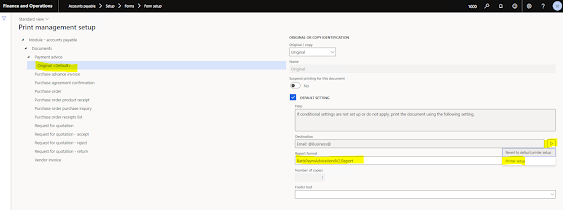
Step 4 : Add setup in Print management
Refer below highlighted path
Result -
Update Values During Data Entity Import in D365FO Updating Field Values During Data Entity Import in Dynamics 365 Finance ...